IP.BUDGETINGAMOUNT function
Description
Returns the budget amount for a specified budget, period, account and optional posting attributes.
Syntax
=IP.BUDGETINGAMOUNT(budget_code, legal entity, period, account, [attr1], [val1], [attr2], [val2], [attr3], [val3])
| Attribute | R/O | Description |
|---|---|---|
| Budget Code | (required) | |
| Legal Entity | (required) | The code of the Legal entity |
| Period | (required) | Period (yyyy) |
| Account | (required) | Account code as in Chart of Accounts |
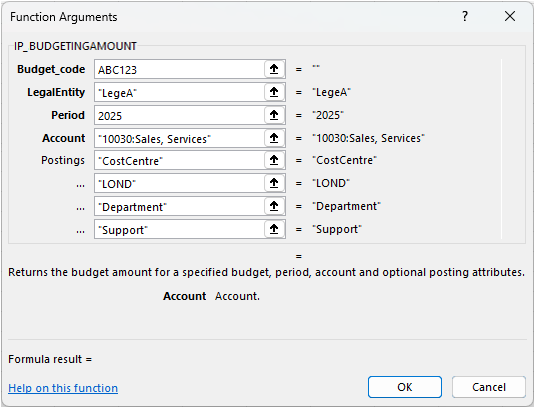
| Postings | (optional) | Any posting attribute such as CostCentre, Department, Product. You can have several Postings at one time. |
Example:
=IP.BUDGETINGAMOUNT("ABC123","LegeA","2025","10030: Sales, Services","Cost Centre","LOND","Department","Supply")
Note
Posting attributes
A Posting attribute refers to attributes that can be used to summarise transactions after they have been posted. Enter the argument in the next input cell. e.g.

Common attributes include Cost centre and Department but can also include custom attributes.
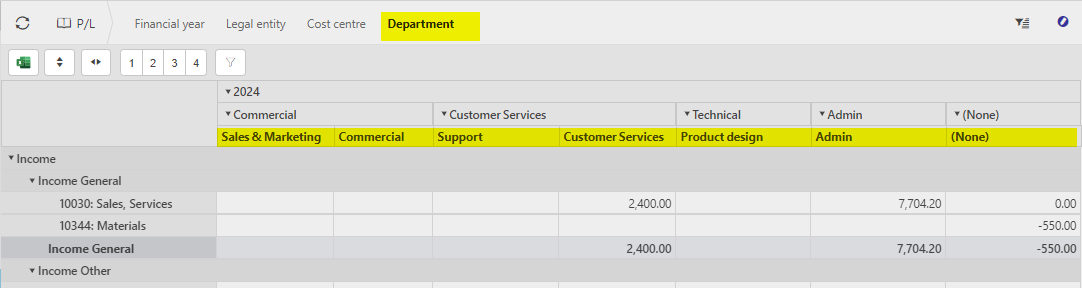
The posting attributes are derived from the Chart of account rules related to the Account code.
Updated December 2025