July, 2026
- Release: 800 Check my version
Executive Finance BETA
We are pleased to introduce Executive Finance, powered by iplicit Insights. This new dashboard provides finance leaders with instant visibility into key financial performance, bringing together core accounting KPIs in a single, intuitive view to support faster, more informed decision-making.
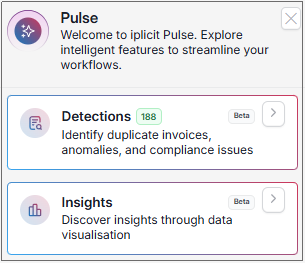
Executive Finance is available from the Insights option in the Pulse menu and is intended for users with global access to all entities within an environment. To access this feature, users must be assigned the new Insights Executive Finance role.
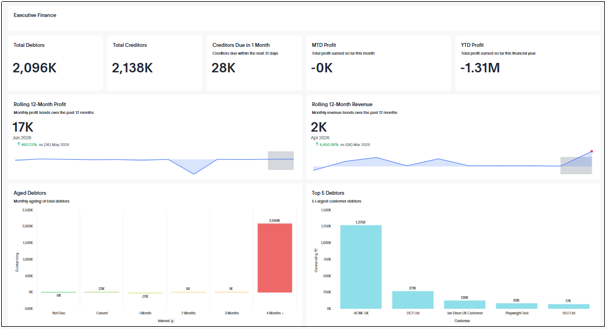
To configure the dashboard, use the Insights Executive Finance Revenue Groups environment setting to specify which account groups should be treated as revenue.
The rollout of Executive Finance will be phased across our customer base following the major release.
Procurement Punchout
iplicit now supports Punchout integration with leading procurement providers including Amazon UK, KCS, Findel and HBS. This enables users to access supplier catalogues directly from within iplicit, select items as part of their purchasing process, and automatically return those selections into purchase orders without manual rekeying.
By connecting to supplier systems in real time, the integration streamlines procurement, improves accuracy, and ensures pricing and product information are always up to date, while maintaining full visibility and control within iplicit’s approval workflows.
VAT Return Improvements
We have enhanced VAT return processing in iplicit to provide a smoother user experience, reduce the risk of errors, and deliver clearer guidance throughout the process.
Improved validation and user feedback
Users now receive clearer guidance when attempting to make corrections to documents that are included in VAT returns that are Pending, Approved, or Processed. This helps ensure users understand which actions are permitted based on the status of the VAT return.
Prevention of multiple draft returns
To support accurate VAT processing, it is no longer possible to have more than one draft VAT return open simultaneously for the same Tax Group.
Complete VAT returns without posting to the ledger
A new option is available for organisations that do not post VAT returns in iplicit, such as those with external entities within a VAT group. Users with the VAT Return: Complete role can now mark a VAT return as complete without posting it to the ledger.
Clearer action buttons
The Estimate button on draft VAT returns has been renamed Recalculate to better reflect the action being performed.
Automatic recalculation on submission
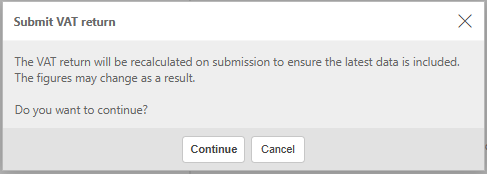
When submitting a VAT return, users are now notified that the return will be recalculated before submission. This ensures that the most up-to-date data is included in the final return.
New warning for potential tax errors
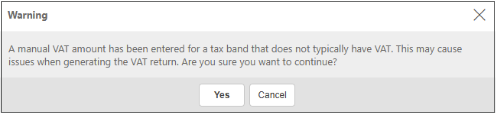
A warning message is displayed if manual tax amount has been added to document lines coded to tax bands that do not typically have tax.
Improved Audit and Reconciliation Visibility
A new optional Tax Return column is now available in the standard Trial Balance and Balance Sheet enquiries. This column displays the VAT return in which each transaction line is included, making it easier to trace balances, support reconciliations, and improve auditability.

Bulk Multi-Co Purchase and Sale Refunds
We have enhanced the refund process for multi-entity environments that operate with centralised banking, reducing manual effort and streamlining refund management across companies.
Bulk purchase and sales refunds can now be processed using a shared central bank account across multiple legal entities. Refunds can be allocated against open credit notes, payments, and receipts regardless of the originating company, with automatic creation of the required intercompany accounting entries.
The feature includes built-in validation to ensure refunds are processed correctly and fully supports existing bulk processing and authorisation workflows.
To support this functionality, the following document types have been introduced:
- Multi-Co Purchase Refund
- Multi-Co Purchase Refund Allocation
- Multi-Co Sale Refund
- Multi-Co Sale Refund Allocation
These additions provide a more efficient and controlled approach to managing refunds in multi-company environments.
Budgeting
Create all budget types including Revisions, Forecasts and Duplicates via an import file.
New options in the budget editor allow a file to be uploaded, automatically building the structure and values based on the import. All imports use the same validation rules and revisions and forecasts are automatically grouped with the original budget for easy tracking.
Creating without a file copies the existing budget structure and values, allowing manual adjustments to be made directly. Existing import functionality and validations remain unchanged when a file is used.
Downloadable import template
New Download Template option to export a ready-to-use Excel file.
The template matches the required import structure, helping ensure data is entered correctly and reducing errors during upload.
Budget checking extended to Purchase Requisitions
Budget checking extended to Purchase Requisitions ensuring consistent budget validation, messaging and controls across selected document types.
- A new Budget checking document setting allows selection of Purchase Orders, Purchase Requisitions or both.
Project included in budget checks
Improving accuracy and visibility when managing budgets against Purchase Orders & Requisitions.
The Project attribute is now included when budget checking is configured at attribute level, ensuring purchases against projects are correctly validated against budgets.
Relevant budget information is now displayed on the Budget tab when a Purchase Order/Requisition exceeds budget.
The Review button for newly created budgets now works as expected, allowing budgets to be reviewed immediately after creation.
Finalised budgets can now be locked and deleted directly from the finder, including support for bulk actions.
Improved support for custom attribute values in budgets.
Fund Management and Financial Structure Enhancements
Several enhancements have been introduced to fund management and financial structures, improving consistency, visibility and control across the system. Updates include streamlined fund allocation on key records, expanded reporting capabilities, clearer ownership through manager assignments and the inclusion of fund data within CDAC, helping users work more efficiently and with greater confidence in their financial data.
A default fund can now be assigned to supplier and customer records, helping to ensure consistent fund allocation and reducing manual input during transaction processing.
New Excel functions have been introduced to support fund types, making it easier to analyse and report on fund data outside of the system.
Cost centres and funds can now have a manager assigned, improving visibility and accountability across financial structures.
Fund and cost centre manager are now available as standard Authorisation Workflow distribution options. This enables workflows to be automatically routed based on the associated fund or cost centre manager.
Funds can no longer be assigned in circular parent relationships, ensuring a valid and consistent hierarchy structure.
Period management
- Financial Year Group setup now supports independent default periods for the Sales Ledger, Purchase Ledger, and General Ledger. This enables greater control over period-end processes, allowing each ledger to be managed and rolled forward separately while maintaining consistent and accurate period selection across documents.
Extended custom data access control
Custom Data Access Control (CDAC) is now supported for manual journals. When enabled, a CDAC attribute must be selected when creating journals, ensuring access and visibility are restricted according to configured data access rules and improving overall data security.
Fund is now available as a Custom Data Access Control (CDAC) attribute. Access to and entry of documents can be restricted to the funds a user has been granted permission to.
Contact Accounts (Suppliers, Customers & Resources)
Contact Accounts can now be created and managed using draft and submit states. Records can be saved as drafts during creation, clearly identified, and prevented from having documents submitted until authorised. Once complete, contact accounts can be submitted, progressing them to the next stage where they can enter authorisation workflows and display appropriate status indicators such as pending authorisation or approved.
A new supplier can now be successfully submitted once valid bank details have been entered. This streamlines the supplier creation process and removes unnecessary delays during setup.
Draft Customers, Suppliers and Resources can now be submitted directly from the finder without opening each record. This includes support for selecting multiple records and submitting them in bulk, making it quicker and easier to manage and approve draft data.
The Submit button has been removed from the generic Contact Accounts finder, preventing invalid actions and improving user experience when managing records.
The Customer Finder now includes Default Cost Centre, Default Department and Default Project as selectable columns.
Prepayments
- Prepayment functionality is now available for expense documents, allowing costs to be automatically spread across accounting periods. This enhancement brings expense processing in line with purchase invoices, with support for prepayment profiles, forecasting and automated journal posting for improved consistency and control.
Other Enhancements & Minor Fixes
Sales & Purchase
Matching now handles multiple related purchase documents more reliably, allowing purchase invoices to be matched against more than one purchase order correctly, even where different matching rules are used within the same document.
Product and account details are now correctly updated when matching existing document lines to purchase orders, ensuring the selected matching data is applied consistently and without being overwritten incorrectly.
Goods Received Notes now respect the source Purchase Order settings, ensuring domestic reverse charge is only applied when explicitly selected.
Location selection now correctly reflects the configuration, and validation ensures only valid locations can be used when creating purchase orders.
Copied invoice lines now appear immediately, even when filters are applied within the invoice. Line counts and displayed data update in real time, removing the need to save the document to view newly copied lines.
Delivery and invoice addresses now remain separate when edited, ensuring details are retained correctly throughout document updates.
The Legal Entity field is now positioned correctly on Sales Quotes and Orders, appearing before Department and CDAC fields. This provides a more logical layout and improves the flow when entering document details.
The option to apply domestic reverse charge now displays correctly on sales orders, ensuring tax settings can be applied as expected.
Documents and Document Types
The Document filter on reports has been refined to display only documents relevant to the selected report. This ensures clearer, more accurate filtering.
The Scan option has been removed from documents in stock-enabled systems where it was not applicable.
Posted write-off documents can now be deallocated from their originating transactions and reallocated as needed. Once deallocated, write-offs can be unposted and reassigned to different invoices, with balances and document statuses updated accordingly.
Restricted actions are now consistently applied when using document templates, ensuring that the selected template’s configuration is reflected accurately on the document.
A discount filter option is now available on the archived documents page. A simple tick box can now be used to control whether discounted documents are displayed.
Submitting documents with longer descriptions no longer generates errors in the Event log, ensuring entries are recorded cleanly regardless of description length.
Required fields on document types now display correctly when left blank, preventing saving and clearly indicating when input is needed.
Reversed interco transactions now respect elimination settings, ensuring consistent reporting and preventing imbalances.
Changes to account selections on manual journal lines are now preserved when editing a draft, preventing accounts from reverting to default values.
A new Responsible filter has been introduced to the GRN and Purchase Invoice finders, aligning with the existing Purchase Order experience. Records can now be filtered by responsible individuals (resources marked as buyers), making it easier to locate and manage relevant documents.
Imports/Exports
Custom fields are now correctly exported using their associated code. This ensures values can be re-imported accurately, improving consistency and reliability when working with resource exports.
Document template import and export options are now visible based on user permissions, ensuring appropriate access without requiring full permissions.
Multiple attachments can now be exported in a single action from the attachment search screen, removing the previous limit and making it easier to retrieve supporting documents. Large exports are processed in the background, allowing you to continue working while the download completes.
Accounts Payable Automation
Attachments now display correctly, ensuring scanned documents remain visible throughout processing and after invoice conversion.
Tooltips for Credit Note and Cash Purchase fields now clearly explain how to separate values, improving usability and reducing input errors.
Custom fields on registered documents now correctly populate with their default values.
Workflows
Approval views now display only the steps relevant to each document within a batch, making information clearer and easier to review.
Large workflows now generate successfully, ensuring complex approval structures can be created without errors.
FX
Bank accounts can no longer be selected as the default account for FX revaluation. This ensures revaluation postings are made only to appropriate non-bank accounts, improving accuracy of FX calculations and preventing incorrect impacts on bank balances.
Issue resolved when deleting the Max amount and Max percent fields in the Foreign Exchange section on the Legal Entities - Advanced tab.
Settings and Configuration
Validation messages now display when amending multiple items within chart of accounts & groups, ensuring account type and parent group selections remain consistent, in line with single-item amendments.
The Project start and Project completion date options have been removed from distribution profiles. Related prepayment and deferred income automations have also been updated to exclude this option.
Changes to the order of top-level dynamic account groups now save correctly.
Copying an existing User Group now correctly includes all associated permissions and settings, ensuring a complete duplicate is created.
Country code requirements are now clearly enforced, ensuring contact groups can be created and saved without error.
Improved labelling and help text on the address type screen.
Improved validation when creating stock location types, preventing errors and ensuring records can be saved successfully.
Newly added addresses on contact records now appear immediately after saving, removing the need to refresh the page.
Improved validations and error messaging on bank statement entry.
Resolved an issue preventing sign-in with a newly reset password. Login now works as expected with updated credentials.
Tooltip labels within the Assets journal tab are now consistently formatted for a clearer user experience.
The Swiss Franc currency symbol has been updated to CHF.
Enhancements have been made to ensure Outside the Scope sales for qualifying overseas services are correctly included in VAT Return Box 6. This update supports accurate reporting for UK VAT compliance when processing international service transactions.
Other items
Dates in the Bank Reconciliation view now remain aligned with the original document line dates, even after period corrections are applied.
Updating the number of days on an absence request now correctly adjusts the end date, ensuring dates and calendar views stay in sync.
Batch payments now follow the expected BACS processing cycle, ensuring payment and processing dates are applied accurately.
Improved handling of zero-value sales invoices when using GoCardless, with clearer behaviour and messaging for failed payment creation.
Assets can now be capitalised without requiring the Fund: Read only permission, aligning permissions with standard asset and invoice processes.
Improved the behaviour of the sort code and account number fields in the mobile app, so that existing placeholder zeros are automatically replaced as details are entered, providing a smoother and more intuitive input experience.
Enquiries
Enquiry drilldowns now support incremental data loading, reducing the risk of timeouts when working with large datasets. Initial results are limited for performance, with a Load more option available when required. Exported data reflects only the records currently loaded, ensuring consistency between on-screen results and Excel output.
Improved ageing parameters in Aged Debt and Aged Creditor enquiries.
Interco payments now appear correctly in the Prompt Payment Analysis enquiry, ensuring more complete and accurate reporting.
Improved parameter field handling for linked enquiries in the Excel add-in.
Dynamic structures now appear correctly in Trial Balance settings, ensuring all relevant options are available when configuring enquiries.
Errors no longer occur when copying enquiries, ensuring all tabs display and function correctly.
Purchase Order documents now appear correctly in the Document Approvals enquiry, ensuring a complete view of items awaiting approval.
User Login reports now correctly display associated Resource and Department information.
The Post Date field in enquiries is now displayed in a standard date format.
Overdue days in the Customer Credit Control - Detail enquiry now correctly reflect the date an invoice was settled when Include Closed is selected. This ensures overdue calculations stop at the point of final payment, providing more accurate reporting for closed items.
Amounts now show the correct tax authority currency when drilling into the Breakdown tab.
Interfaces
New or Updated Bank Interfaces
Barclays BACS interface (large currency value handling)
Finestra Direct Debit Processing File – no dashes
HSBC Cross-border USD pain.001.001.03
API Enhancements
Please refer to the API changelog for a full list of changes.