Tax Authorities
Note
To view the legacy version, please select Legacy User Guide.
Each Tax Authority has its own individual tax set up. There are nuances that relate to each including which Tax Bands and Tax Codes can be used as well as the tax rates applicable.
Typically, each Tax Authority exists in isolation (e.g. England & Wales) but it is also possible for Tax Authorities to have a Parent Tax Authority, an example of this is in Canada where there is a Tax Authority for each province and each of these has "Canada" as the parent.
Due to the complexity of tax set up, this information is distributed as author based data.
Tax rates are typically set as author based values but the Exception is Custom tax rates which can be set by the Customer for their specific needs.
Tax Authority is set on Legal Entities, Customers, Suppliers, Tax Groups, etc.
How to view Tax Authorities
Viewing Tax Authorities
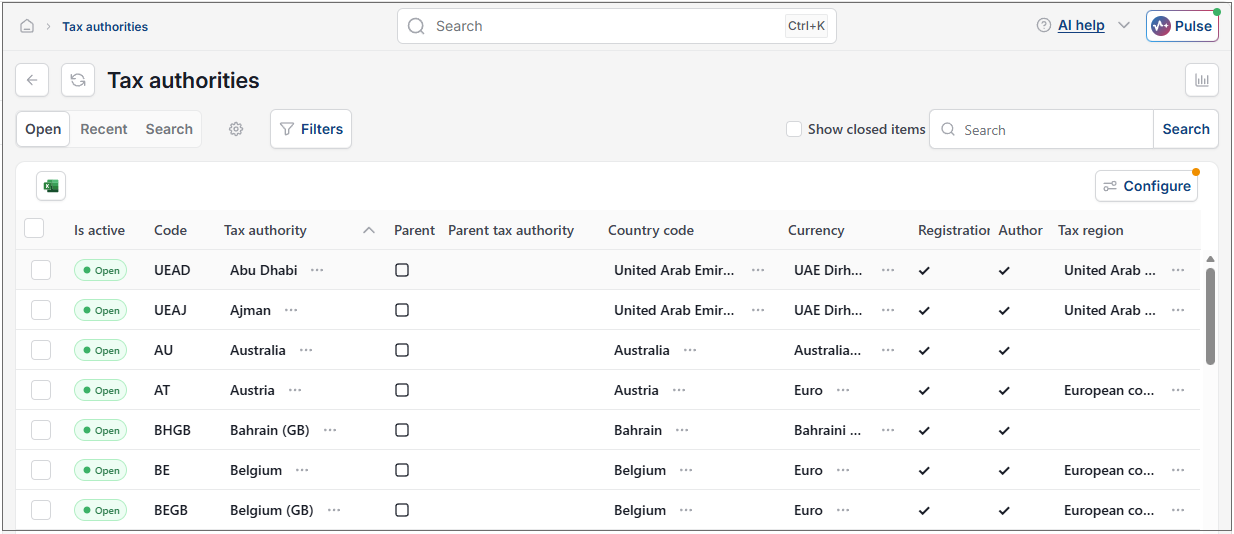
As per Generic Navigation options, either from left-hand navigation panel, expand Settings and select Tax authorities from the Tax folder or enter Tax authorities in the Search option.
This will then show the Tax authorities on the system where normal customisation of Sets can be used.
Tip
To modify the columns displayed, select  option on the right of the column display, then tick/untick the information you want to hide or display.
Tax Authority - United Kingdom
The following screenshot is the header for the United Kingdom Tax Authority.
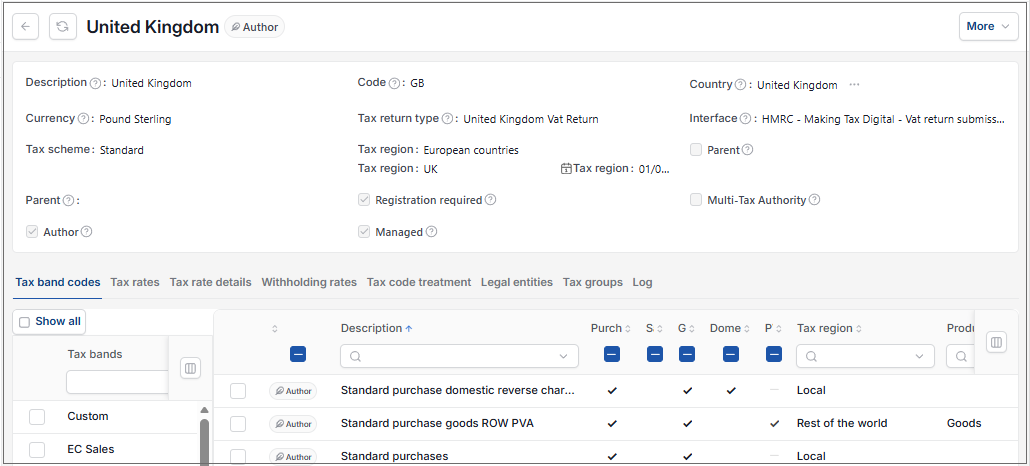
Code: Unique code for the Tax Authority
Description: Unique description for the Tax Authority
Decimal places: Default decimal places for documents related to the Tax Authority
Currency: Default Currency which will be defaulted by e.g. Legal Entities, Customers and Suppliers related to the Tax Authority.
Country: Default Country which will be defaulted by e.g. Legal Entities, Customers and Suppliers related to the Tax Authority.
Tax Return Type: This is the Tax Return type structure what will be used by Tax Returns related (via Tax Group) to this Tax Authority
Interface: This is either the output format or an interface which is used for the submission of the Tax return.
Tax Region: Where exists, this describes the region(s) that the Tax Authority exists within and is used to define tax handling. Many Tax Authorities are supported along with their relationships to each other. For example, at the date of writing, EU Tax Authorities are linked by the "European Countries" tax regions.
Parent: When ticked, this Tax Authority can be used as a parent
Point of Sale Tax Authority: Where ticked, upon creation of Sale documents, the Tax Authority is taken from the Customer.
Legal Entity Tax Authority same region: Where ticked, upon creation of Purchase document(s), the Tax Authority is taken from the Legal Entity
Registration required: Where ticked, a Tax Registration is required for this Tax Authority if document(s) are created against it. In Canada: Ontario for example, there are both a Federal "Canada" and Provincial "Canada: Ontario" tax returns.
Multi-Tax Authority: Where ticked, the Tax Authority is assumed to be related to Multiple Tax Authorities. This is required if a Legal Entity has a Tax registration in more than one Tax Authority. It is also required in instances such as Canadian Tax Authorities where they are as a minimum related to the Federal "Canada" Tax Authority as well as the other Canadian Tax Authorities
Author: This signifies that the Tax Authority is setup by the Author and distributed as author based data.
Managed: If ticked, the Tax Authority will be managed by iplicit. Otherwise, the User will be in control of Tax rate changes.
Tax Authority - Canada: Ontario
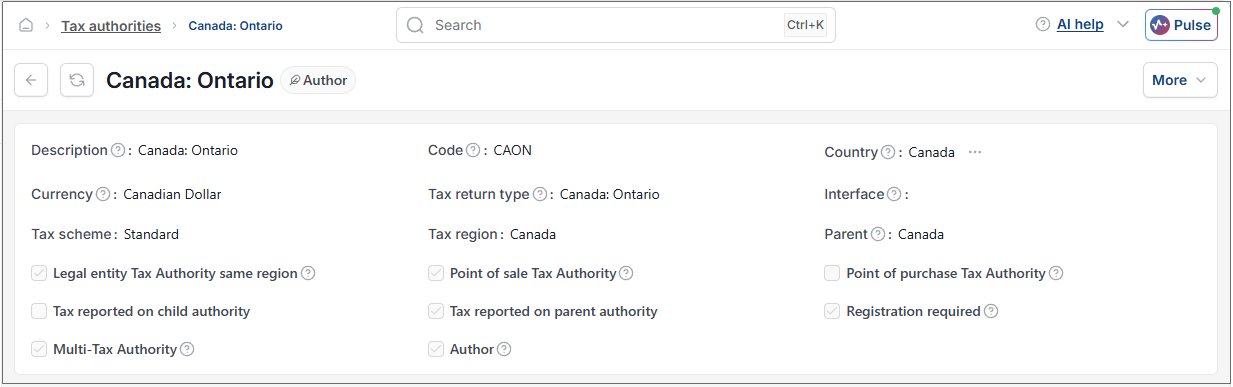
The following screenshot is the header for the "Canada: Ontario" Tax Authority.
In addition to the England & Wales overview above, the following cells have specific meaning:
Parent: When ticked, this Tax Authority can be used as a parent
Parent Tax Authority: In Canada, all Provincial Tax Authorities have a parent Tax Authority ("Canada") and depending upon the Province will have a responsibility to produce Tax Returns for the Parent and Provinces.
Point of Sale Tax Authority: Where ticked, upon creation of Sale documents, the Tax Authority is taken from the Customer. This is the case with Canadian tax.
Legal Entity Tax Authority same region: Where ticked, upon creation of Purchase document(s), the Tax Authority is taken from the Legal Entity
Registration required: Where ticked, a Tax Registration is required for this Tax Authority if document(s) are created against it. In Canada: Ontario for example, there are both a Federal "Canada" and Provincial "Canada: Ontario" tax returns.
Multi-Tax Authority: Where ticked, the Tax Authority is assumed to be related to Multiple Tax Authorities. This is required if a Legal Entity has a Tax registration in more than one Tax Authority. It is also required in instances such as Canadian Tax Authorities where they are as a minimum related to the Federal "Canada" Tax Authority as well as the other Canadian Tax Authorities
Tax Band codes - England & Wales
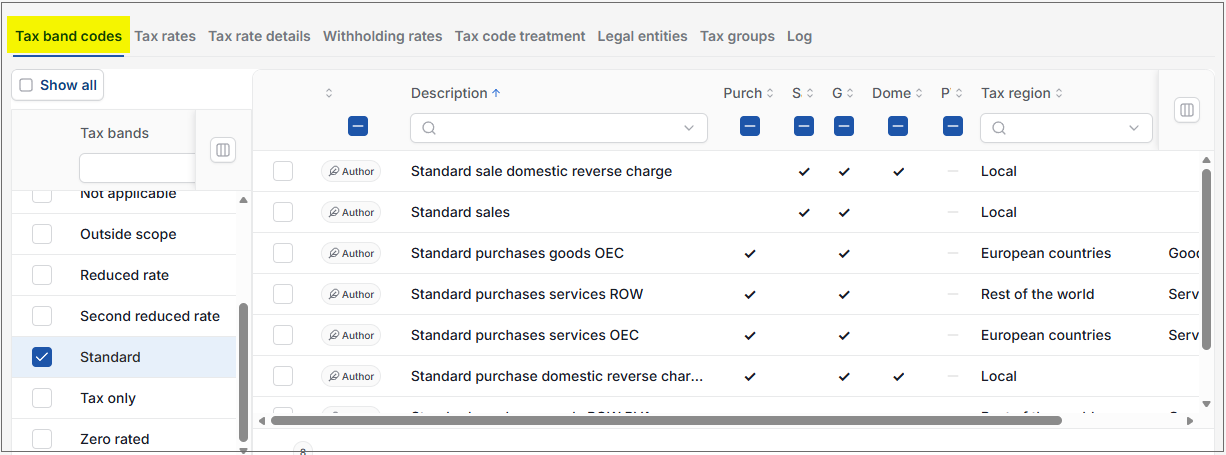
The following table shows the valid Tax Bands and associated Tax Codes that are used in England & Wales. These change from one Tax Authority to another.
Tax Rates - England & Wales
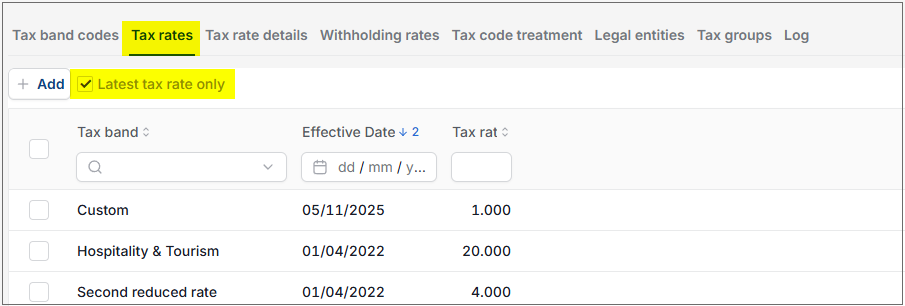
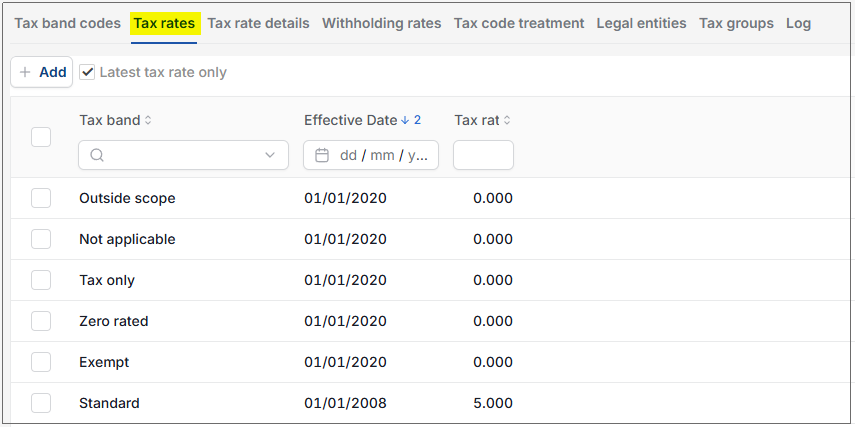
The following table shows the prevalent Tax Rates in England & Wales. The Tax Rates may vary for each Tax Authority (e.g. Canada: Ontario)
Note
By default, only the latest rates are shown. Untick "Latest tax rate only" to see all Tax Rates for the Tax Authority.
Selecting a Customer created Tax Rate allows the User* to Edit the Rate and Effective date.
Selecting an Authored Tax Rate will not have the Edit option.
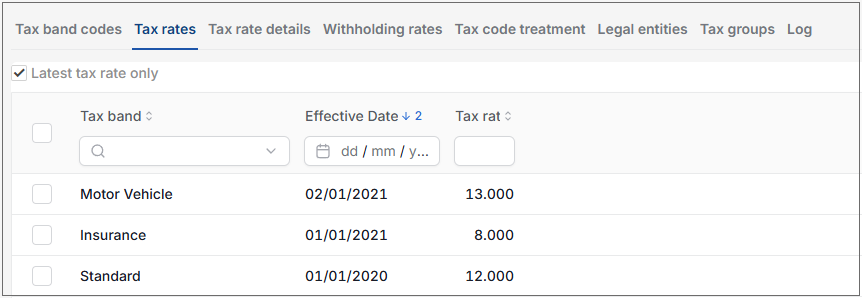
Tax Rates - Canada: Ontario
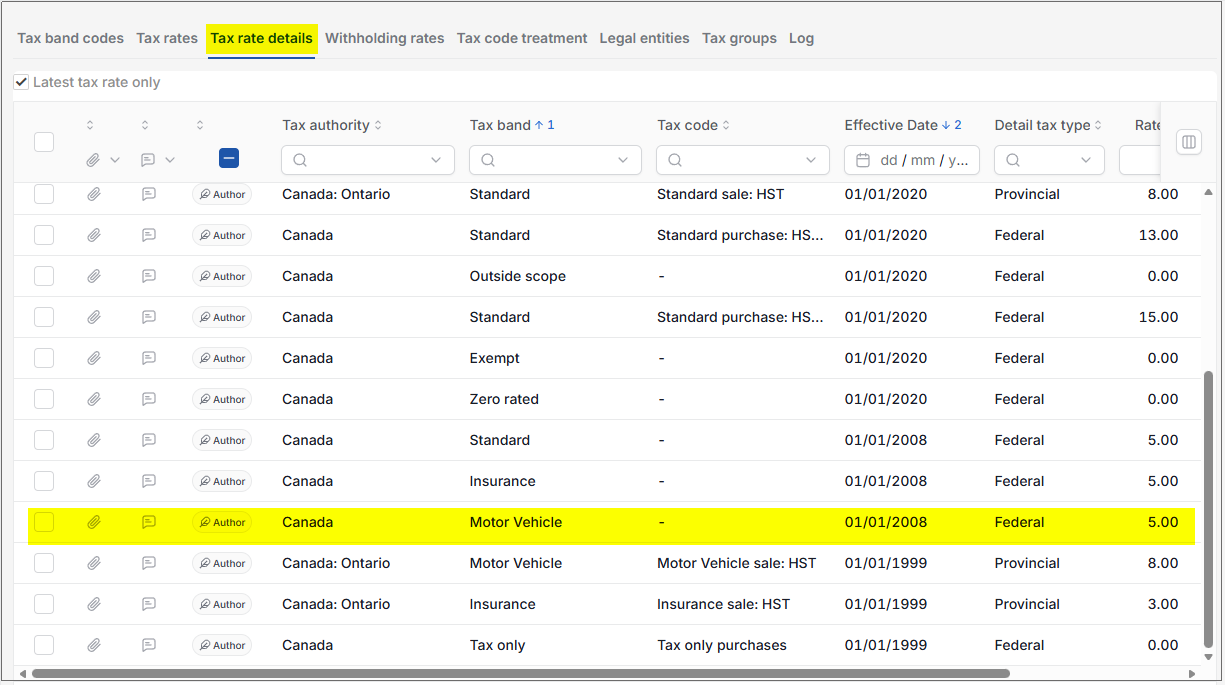
Tax rates may be the product of multiple tax rate details. In the table below for example the Motor Vehicle rate is made up of 5% GST and 8% Provincial Motor Vehicle tax.
Tax Rates - Canada (England and Wales)
Tax rates may be the product of multiple tax rate details.
Tax Rate details- England & Wales
The table below shows the tax rates (at the date of writing) for England & Wales. These tax rate details are used to calculate the Tax Rates.
Each Tax rate relates to a specific Tax Band and has an effective date. The effective date allows for the recording of multiple tax rates, both in the past and the future.
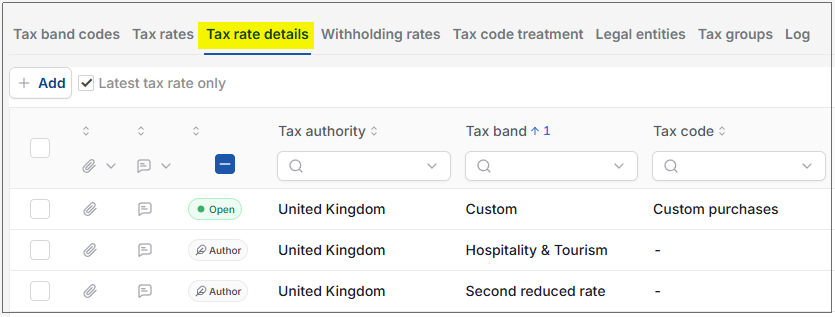
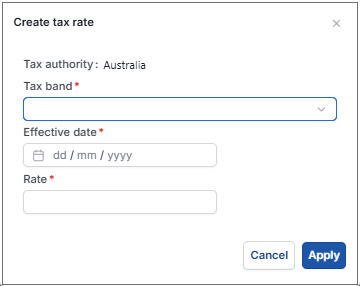
Selecting the Add enables the User to add a new Tax Band.
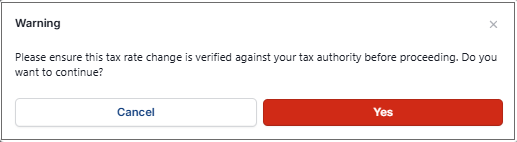
After confirming message, the User is presented with a dropdown option of tax rates plus % rate.
On a non-authored Tax Authority, selecting a Tax Band presents an Edit option to allow the User to change the date that the tax rate comes into effect.
If transactions have been posted since the date of change, a pop up box shows warning the customer posted transactions will not automatically update and will have to be manually updated.
Tax Rate details- Canada: Ontario
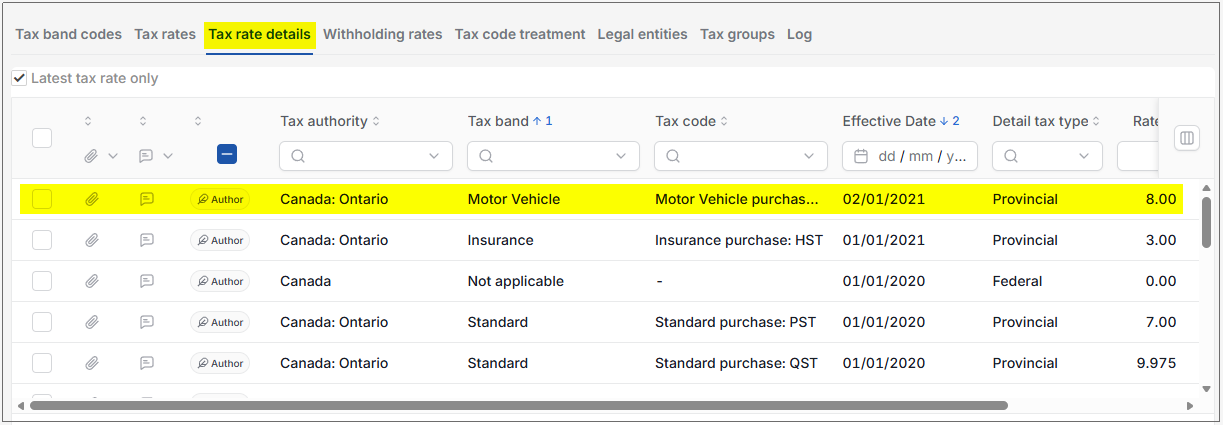
The table below shows the tax rates (at the date of writing) for Canada: Ontario. These tax rate details are used to calculate the Tax Rates.
Each Tax rate relates to a specific Tax Band and has an effective date. The effective date allows for the recording of multiple tax rates, both in the past and the future.
Using "Motor Vehicle" as an example, for Canada: Ontario there is a Provincial rate of 8% and a Federal rate (GST) of 5%. This produces an aggregated "Motor Vehicle" tax rate of 13%.
Custom tax rates
- Tax rates are typically set as author based values but the Exception is Custom tax rates which can be set by the Customer for their specific needs.
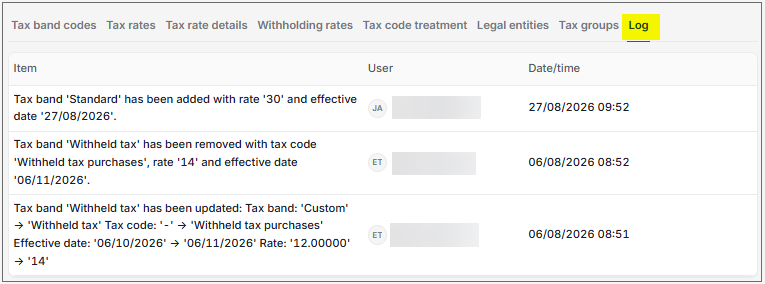
Log
When a tax rate is created/edited/deleted the change is logged in the Log tab, showing the change that was made, the user who made the change and the date
Updated August 2026