IP.GLDASGROUPFTBASEAMOUNT function
Description
Returns the fund type amount for a specified legal entity, period, dynamic account group and optional posting attributes.
Syntax
=IP.GLDASGROUPFTBASEAMOUNT (fund_type, legal_entity, period, dynamic_account_structure, dynamic_account_structure_group, [attr1], [val1], [attr2], [val2], [attr3], [val3])
| Attribute | R/O | Description |
|---|---|---|
| Fund Type | (required) | |
| Legal_entity | (required) | Legal entity code |
| Period | (required) | Period (yyyy) |
| DAS | (required) | |
| DAS Group | (required) | |
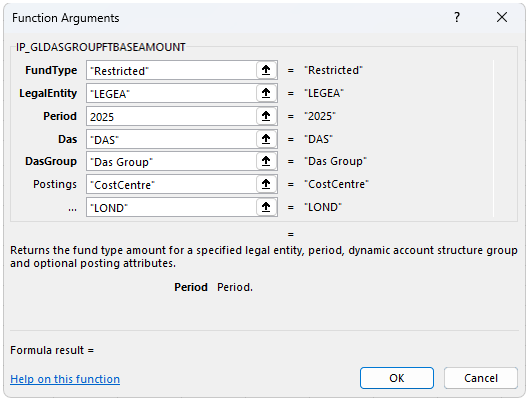
| Postings | (optional) | Any posting attribute such as CostCentre, Department, Product. You can have several Postings at one time. |
Example:
=IP.GLDASGROUPFTBASEAMOUNT("Restricted","LegeA","2025","DAS", "DAS Group","Cost Centre","LOND")
Note
Posting attributes
A Posting attribute refers to attributes that can be used to summarise transactions after they have been posted. Enter the argument in the next input cell. e.g.

Common attributes include Cost centre and Department but can also include custom attributes.
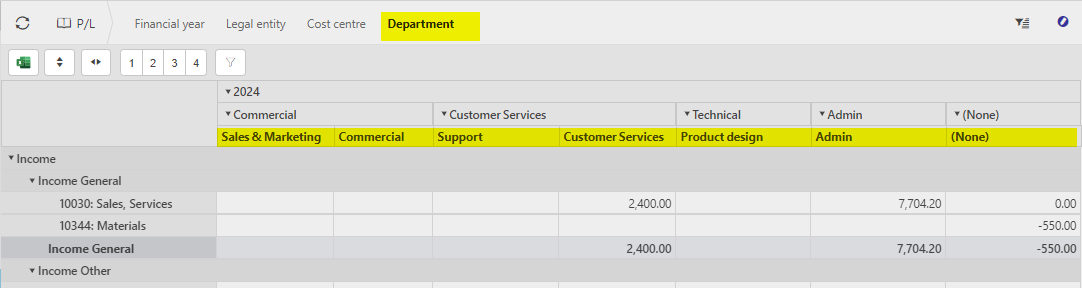
The posting attributes are derived from the Chart of account rules related to the Account code.
Updated May 2026