May, 2026
- Release: 799 Check my version
AI Detect beta
We’re pleased to announce that AI Detect in iplicit is now available to all customers, while remaining in beta.

AI Detect is designed to transform manual accounting processes into intelligent, automated workflows. It enhances invoice accuracy, accelerates processing, and strengthens fraud detection—helping finance teams work more efficiently and with greater confidence.
The feature automatically reviews purchase invoices and flags potential issues in real time. It identifies duplicate invoices, highlights transactions from new suppliers, detects unusually high supplier invoices, and flags entries made outside normal business hours. These checks help reduce errors, surface unusual activity, and provide stronger control over your financial data as the feature continues to evolve through its beta phase.
Accounting Period Frequency
A new Accounting Period framework has been introduced to support non calendar period structures (such as 4-4-5) across deferred income, prepayments and fixed asset depreciation. Amounts are now apportioned by days per accounting period rather than calendar months, ensuring accurate spreading of deprecation for variable length periods.
AP Automation Enhancements
Several improvements have been made to increase accuracy and flexibility when processing documents through AP Automation:
- Supplier matching has been improved by ignoring whitespace in tax registration numbers and company numbers.
- Mandatory checks have been strengthened to ensure required data is provided before processing registered documents through to the next stage.
- A new option has been added to Legal Entities to indicate they are not registered for VAT. This is to ensure better handling of VAT on documents processed through AP Automation where an organisation is not registered for VAT.
- Matching accuracy has been enhanced with support for partial purchase order number matches, helping link documents to the correct supplier even when PO formats vary.
- Improved handling of invoices with incorrect dates to ensure invoices with invalid date formats are now processed successfully. When converting registered documents, the period on detail lines now updates correctly.
- Manual changes made by users are now accurately reflected in the registered documents finder and redundant fields have been removed for clarity.
Data Import & Export Enhancements
A significant number of improvements to importing, exporting and updating data in iplicit have been made to facilitate efficient and accurate data take-on and maintenance.
Legal Entity
Full import/export support.
- Legal Entities
- Bank Account Defaults
- Report Text
- Foreign Exchange
- Tax Registrations
- Postponed VAT Accounting
- Locations
- Interco
- Emails
Allows for record updates and new record creation.
Tax Groups
Full import/export support.
- Tax groups
- Partial Tax Rules
Allows for record updates and new record creation.
Financial Year Groups
- Full import/export support.
- Allows for record updates and new record creation.
Data Entry Control
- Full import/export support.
- Allows for record updates.
Data Access Control
- Full import/export support.
- Allows for record updates and new record creation.
Timesheet Products
- Added support for Custom fields.
Assets
- Added support for the new Accounting period deprecation frequency.
Document Import
- Added support for Recurring and Template documents.
- Added support for ignoring Partial Tax.
- Extra spaces are now automatically removed from attribute values and custom field headings during import, helping ensure data is consistent and displays correctly.
Manual Journal Import
- Added support for Recurring and Template documents.
- Added support for ignoring Partial Tax.
- Extra spaces are now automatically removed from attribute values and custom field headings during import, helping ensure data is consistent and displays correctly.
- Added support for excluding lines with zero as a value.
- Journal imports no longer calculate VAT on standard‑rated lines where the tax amount is set to zero in the import file and marked as a tax adjustment.
User Account Import
- Enhanced to automatically populate key contact details ensuring complete contact information and enabling email communications to function correctly. When importing users, the system now:
- Uses the description field to populate the user’s full name in the Contacts tab.
- Uses the email field to populate the user’s contact email address, applying the correct user email type.
Auto Allocating
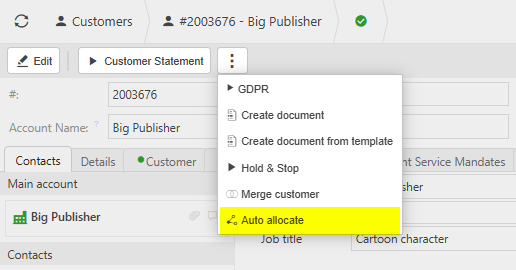
A new Auto Allocate option is available on customer, supplier and resource accounts, allowing outstanding receipts and credits to be automatically matched to invoices. Allocations prioritise exact value matches and then apply remaining amounts from the oldest documents first, with a clear summary displayed of all allocations made.
Improved data validation and warnings
A number of improvements to the data validation and warnings in iplicit have been made.
- Improved safeguards in the Chart of Accounts, with new warnings when enabling revaluation on bank or control accounts and when removing the bank account flag from accounts with postings.
- General ledger accounts that are configured as account defaults can no longer be edited until they are removed from the account defaults configuration, helping prevent unintended posting issues. Bank account defaults are excluded from this restriction.
- A warning is now displayed when changing the currency of a bank account that already has posted documents, advising users to seek guidance before proceeding.
- Product stock valuation methods can no longer be changed once stock transactions have been posted. This ensures stock valuation and related costs remain accurate and consistent across all stock movements, documents and reports.
- A new option is available in Environment Defaults to nominate one or more users to receive email failure notifications. Notifications are sent when an email fails due to an error, invalid address, duplicate message or communication issue
- The legacy label has been removed from the Locations finder.
- A warning is now displayed when creating a new asset with a reducing balance depreciation method where the end month of the financial year group does not match with the expected end month of the financial years.
- Validation has been added to prevent bank statements from being created without a statement date, avoiding incorrect default dates.
Document & Document Types
A number of improvements to Documents and Document Types in iplicit have been made.
New Document Types
- Sales Order Write Off (credit entry), supporting negative write‑offs linked to sales orders.
- Purchase order back-to-back (stock) and Sales order back-to-back (stock), allowing stock quantities to be correctly tracked through back‑to‑back order, dispatch and receipt processes.
- Cash Book Transfer (Eliminates), allowing intercompany bank transfers to be treated as eliminations and included or excluded from reports accordingly.
Custom Data Access Control support added to document templates and recurring documents, ensuring access controls and values are carried through consistently to generated documents.
Manual journal document types can now be configured to enable an Elimination tick box on journal lines. This allows intercompany postings to be correctly flagged and consistently included or excluded from reports and enquiries based on elimination settings.
A new environment default has been introduced, enabling configuration of the document types eligible for manual asset capitalisation and providing improved control over manual capitalisation.
A new Manual tax posting option is available on archive document types, allowing tax postings to be suppressed where tax is handled via separate document lines.
The Default Reversal document type is now correctly set with a Document Class of “Reversal”.
Users can no longer allocate to disputed documents when using the icon based allocation option.
Fixed an issue where linked documents in intercompany sales could not be opened. Users can now view both the generated purchase invoice and the related sales template directly from the sales invoice as expected.
Outstanding amounts are now correctly removed when imported documents are abandoned.
For back‑to‑back orders matched on quantity, you can now change the currency on the purchase order header. Line values are recalculated automatically using the relevant exchange rates.
Document types can no longer be saved with incomplete custom field definitions, ensuring mandatory fields are always populated.
Reversals created from FX revaluations now post to the appropriate accounting periods, aligned with their source documents.
Recurring sales documents now use the document type’s payment terms for due dates where these are set.
Payment method now displays correctly on Cash documents.
When reversing a document, closed accounting periods are no-longer presented as an option.
Automations
- Accruals created using automation with aggregation enabled now include the originating document description on journal lines.
- Journals created by multi company automations can be abandoned when in draft or error state, without affecting other linked multi company journals.
- Minor issues with allocations of FX Realised documents resolved.
- Multi company journals processed via automation now correctly enforce data entry control.
- Disbursement line amounts now correctly convert to the transaction currency based on the source document currency instead of the base currency.
- Non applicable tax lines on journals created by the accruals automation no longer appear in the GL Reconciliation.
Enquiries & reports
New Budgeting enquiries
New enquiries provide enhanced visibility across period, year to date and full year performance to support the new budgeting module.
Budget vs Actual, showing budget, actual and variance values for a selected period.
Budget vs Actual (YTD), allowing users to compare budget, actual and variance values by period, year to date and full financial year.
Budget Holder – Department provides a flexible view of budget, actuals, commitments and remaining spend.
Added a new option when sending customer statements, allowing statements to be sent to customers with no outstanding debtor balance.

Direct Debit Reversals now display correctly on customer statements when the ‘Exclude Reversals’ option is unticked.
Customer statements no longer show multiple transaction lines where base and transaction currencies result in different outstanding values.
UI and UX improvements have been made to enquiry drill-downs, ensuring the drill-down panel no longer blocks navigation buttons.
Aged Debt and Aged Creditors enquiry templates now work correctly when using posting fields.
Improved support for exporting large enquiry datasets via the scheduler, ensuring all data is included and exports complete successfully without failure.
Row totals are now consistently displayed in enquiries, regardless of the number of rows within a group.
Reports and enquiries related to the legacy Absence and Task features are now hidden when those legacy features are not enabled.
Legacy Project Costing & Billing report has been removed.
Abandoned purchase orders no longer appear in the project committed values or the committed Trial Balance tab.
Other Enhancements & Minor Fixes
Projects can now be configured to require a contact account. Project groups allow control over the permitted contact type and whether a contact is mandatory, helping ensure projects are created consistently and accurately.
Projects selected within asset views now display the correct project details rather than internal identifiers.
A new button has been added to the Interco tab on the legal entity screen, allowing you to quickly apply intercompany configuration across multiple legal entities in bulk.

Exchange rate pairs can now be refreshed manually, giving you the flexibility to update rates on demand from your chosen provider.

Bank account attribute values now display correctly on revaluation GL entries.
Bank transactions imported via Yapily are now handled more reliably, ensuring that transactions with the same name, date and amount are correctly included.
Plaid bank feed statements now display only transactions from the selected statement start date, ensuring transaction lists align correctly with the statement period.
Unused loan types can now be deleted once they have been locked, provided they haven’t been used in any documents or configuration.
Duplicate search entries no longer appear for pending authorisations.
Purchase orders sent out automatically at completion of an authorisation workflow now correctly update the “last sent” date on the document.
VAT Return submissions now process correctly for zero rated tax bands.
Admin Workflow Reject no longer incorrectly updates the status flag, documents now remain correctly marked as draft.
Fixed an issue where the Profit & Loss report failed with a 500 error when a Chart of Accounts name was 100 characters long. The report now runs correctly regardless of account name length.
Budget Forecast (v1) notes can now be deleted as expected.
Timesheet products no longer appear incorrectly within the expense product list.
Copying timesheets no longer results in validation errors following changes to timesheet product settings.
The default value for Balance Check Rounding Decimal Places now matches the value shown in the UI.
Receipt processing no longer fails due to rounding errors where bank amounts are empty, improving reliability when working with foreign currencies.
Parent funds no longer appear within their own sections, ensuring fund trees display accurately.
Task content is now retained correctly when editing task attributes, preventing unsaved text from being lost.
Catalog items are now only flagged as duplicates within the same catalog, allowing identical item codes to exist across different catalogs without error.
Tax Authority Updates
- Romania: Support for Reduced Rate, ROW and PVA categories.
- Hungary (Ireland): New tax authority with full rate coverage.
- Liechtenstein: New tax authority with full rate coverage.
Interfaces
New or Updated Bank Interfaces
- Lloyds' Pay & Collect Online Direct Debit Processing File
- HSBC 18 Bulk Payment File
Coming soon & early adopter programmes
The following exciting new modules and features are now available in beta to a select group of early adopter customers. This is a great opportunity to explore upcoming functionality ahead of general release, provide feedback, and help shape the final product. If you want to find out more or are interested in getting early access and being part of this group, please contact our customer services team.
iplicitPay
Introducing iplicitPay, the modern and secure way to make payments directly from iplicit. Designed to simplify & secure your payment process, iplicitPay enables you to initiate and manage payments seamlessly without leaving the platform. By bringing payments into iplicit and leveraging the open banking platform, iplicitPay eliminates the need to download and upload payment files, with all payments transmitted electronically and securely to your bank - all while maintaining the highest standards of security.
Executive Finance
We are excited to announce Executive Finance delivered by iplicit Insights, a powerful new view designed to give finance leaders instant visibility of key accounting performance. The dashboard brings together core financial KPIs into a single, clear view to support faster, more confident decision‑making.
With built‑in AI Insights, users can explore and visualise their data, ask questions in natural language, and surface meaningful insights with ease. The AI highlights trends, explains movements, and draws attention to what matters most - supporting faster, more informed decision‑making without the need for complex analysis.
API Enhancements
Please refer to the API changelog for a full list of changes.