Fund Types
Note
To view the legacy version, please select Legacy User Guide.
Fund types are used to categorise and manage different sources of funds, especially in organisations like non-profits, government entities, and educational institutions.
e.g.
Unrestricted Funds: These funds can be used for any purpose that supports the organisation’s objectives.
Restricted Funds: These funds come with specific donor-imposed restrictions on how they can be used.
Temporarily Restricted Funds: These funds are restricted for a specific purpose or time period. Once the restriction is met, they can be used for general purposes.
Permanently Restricted Funds: These funds are to be maintained in perpetuity, with only the income generated from them being used for specific purposes.
Government Funds: Used by public sector entities to finance public services and infrastructure projects.
Endowment Funds: These are funds where the principal amount is kept intact, and only the income generated from it is used, often for scholarships, research, or other long-term projects.
How to view Fund Types
Viewing Fund Types
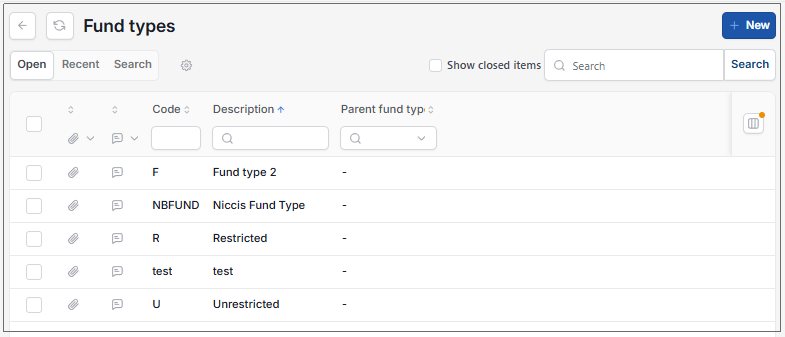
As per Generic Navigation options, either from left-hand navigation panel, expand Settings and select Fund types from the General folder or enter Fund types in the Search option.
This will then show the Fund types on the system where normal customisation of Sets can be used.
Tip
To modify the columns displayed, select  option on the right of the column display, then tick/untick the information you want to hide or display.
How to create Fund Types
Create a new Fund Type
Select Fund types from one of the options as shown above in Viewing Fund types.
Press New.
Enter the required fields.

Custom Fields: These can be added by selecting
 icin in the Custom fields tab, then filling out the selection criteria.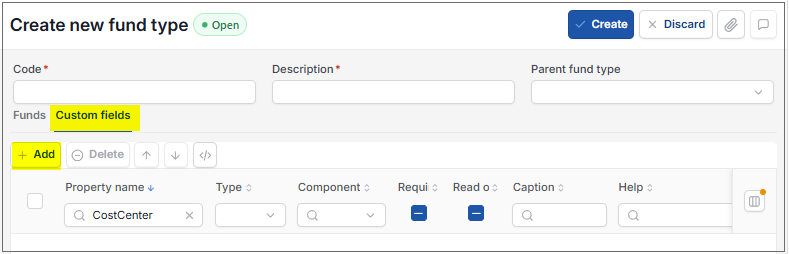
Warning
You cannot add a Custom Field containing a space. If you do, you will get a warning message and will be prevented from completing the Save.
Select Create once complete.
Updated August 2026