How to reduce Reported Data
To optimise system performance and improve usability, the system limits the number of results displayed.
If the number of records exceeds the limit, then a banner will show, e.g.

Why limits are important
To keep the system running smoothly for all users, we limit the number of results displayed. This helps prevent extraordinary loads that could slow down the system or cause disruptions.
How to Work with Limits
Filters
To improve your results and focus on the most relevant information, take full advantage of the available filters. These filters help you narrow down your results by specific date ranges, categories, or other criteria, ensuring you only view the data that’s important to you.
Finder screens
Select documents that you want to search e.g Sale Orders either via the finder or from the Search option.
Use the
 option to open up a list of attributes.
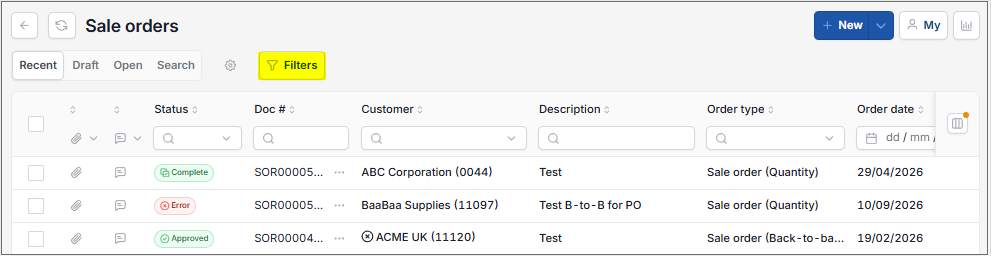
This opens specific attributes depending on the document menu selected, e.g. for Sales Orders.
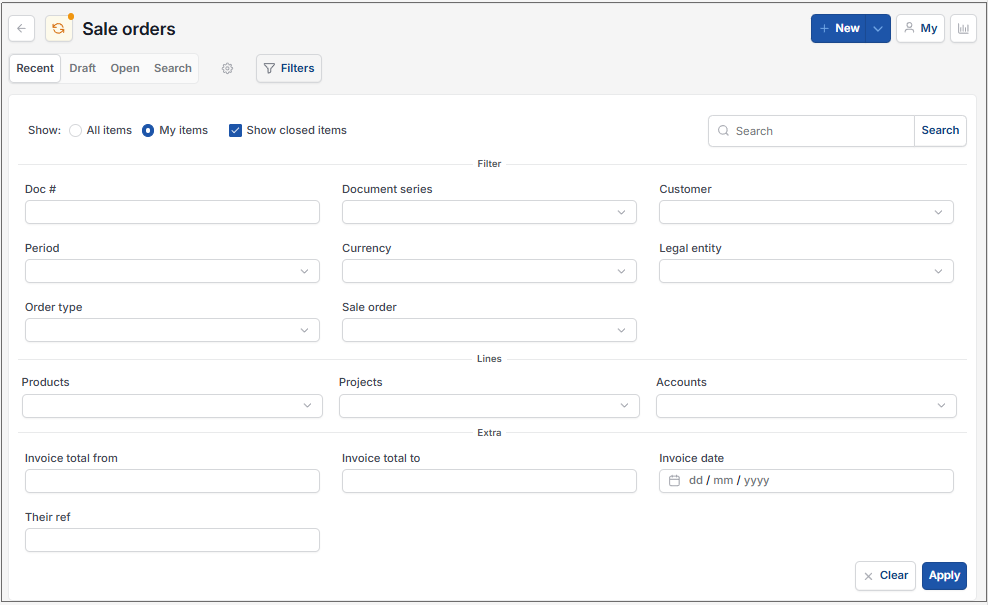
Enter fields to filter documents, then select the
 icon to update the document list.
Search option
To find specific document(s) you can use the Search option to search on DocNo, Description, TheirRef or TheirDocNo - either entering the whole field value or part of.

This will list all the documents matching the search criteria.
Enquiry screens
Filters are available on enquiry screens to specify the data that will be returned. Using them helps ensure accuracy and enhances performance by limiting results to only the relevant data. Common filters on financial enquiries: are Legal entity, Financial year, Period and date ranges.
If you are using a drilldown feature, consider selecting a subtotal to zoom into a specific section of the data. This approach reduces the scope of data and makes it easier to analyze.
When detailed data becomes overwhelming, explore alternative summary reports. These reports provide high-level insights without requiring the processing of large amounts of raw data.
Contacting Support
If you believe your use case is unavoidable, contact our support team to discuss your needs. We can advise on alternative workflows or, in some cases, increase the limits to meet your requirements.
Tip
Regularly review your reporting requirements to ensure that filters and drilldowns are applied appropriately. Combining summary reports and drilldowns can create a more efficient analysis process. If your data needs are complex, consider discussing with your team or administrator about custom report options that better suit your workflows.
Updated November 2026